MKT Post is a software for posting advertisements, selling products and optimizing 200% of your marketing campaign’s effectiveness quickly. The software posts advertisements to thousands of groups, fanpages, and personal profiles with just a click. Helping you build a Facebook Reels channel to reach millions of people in a simple way. And in this article, MKT Software will guide you on how to manage groups in MKT Post Software.
Manage groups in MKT PostMKT Post Features
Below are the features ofMKT Post software:
MKT Post FeaturesSEE MORE:Instructions for managing Facebook accounts on MKT Post Software
MKT Post software is a powerful tool that helps manage and automate posting and commenting on many Facebook groups, providing maximum support for marketing activities. Below are the Groups management features of MKT Post.
Add Category
Add category
Select Group Management
Then select Add Category
Enter the name of your group category
Then click the + sign
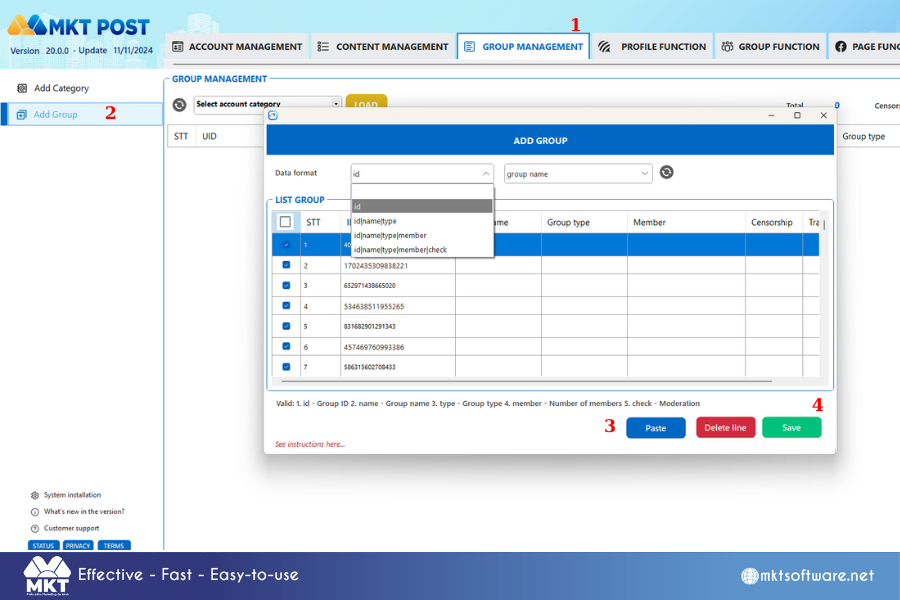
Add Groups
Add group
Select Data Format: id, id|name, id|name|type, id|name|type|member
Select the Category to save
Copy the Group format you have -> Select Paste
Then select Save to save the Group list
MKT Post software allows displaying information about the group as follows: ID|Group name|Group type|Number of members|Censorship. Please prepare a Text Document file about the Group list containing the above formats before importing into the software.
Conclusion
Knowing how to manage groups in MKT Post effectively helps you streamline your social media marketing efforts. Hope you success!
Contact me:Telegram: @dquynhdav